Table of Contents
ESP32/esp-idf LoRa project quick start
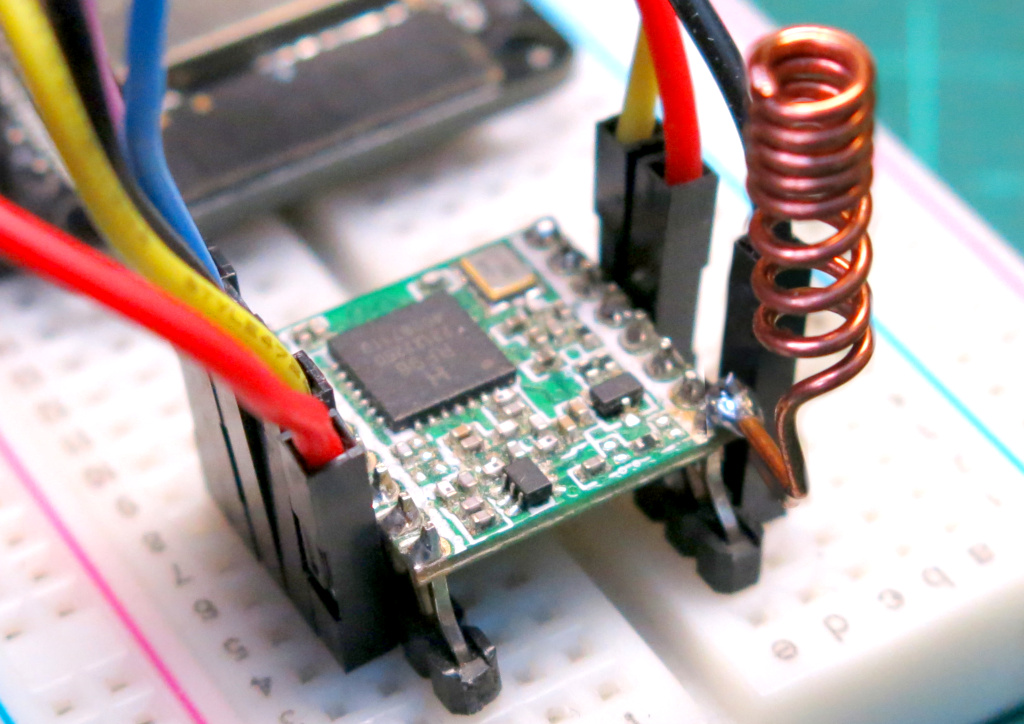
If you need to bang together a quick LoRa-based project on an ESP32 using esp-idf (not Arduino) so you can get going in a hurry, follow along here.
Parts needed:
- ESP32 or higher
- RFM95 SX1276 LoRa transceiver (915MHz Module)
- Breadboard and wires
The focus on this quick start is to aim for 915MHz. Our setup will be configured to pull Meshcore packets out of the air configured for the Australian NSW/ACT Regional settings. But you can easily change this for your region.
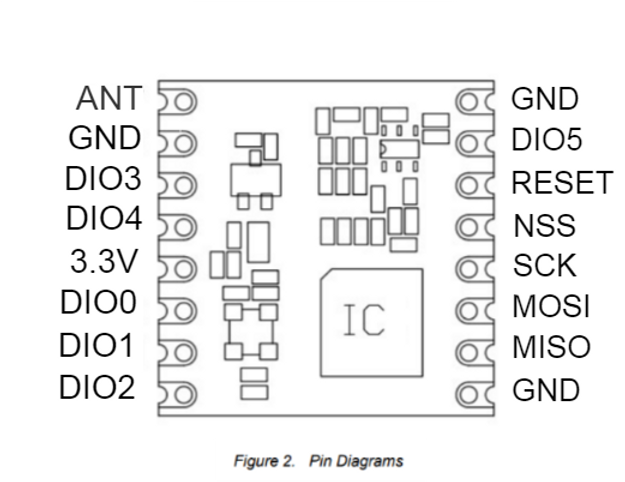
LoRa 915mhz board pinouts
This shows a fairly common ESP32 dev board. But they are not all the same.

This is also a good illustration showing where the pins are on the RFM95.
Creating and configuring the project
1. Open ESP-IDF 5.3.2 PowerShell Create a blank project with:
idf.py create-project lora-project
If you're using an esp32 set it here. Ensure you set the right esp32 hardware, eg: esp32, esp32s2, etc
idf.py set-target esp32
Ensure you know how much memory is on board your esp32. Set the memory on board, and the frequency for the FreeRTOS tick:
idf.py menuconfig
	Serial Flasher config > Flash size > 4MB
	Component > FreeRTOS > Kernel > configTICK_RATE_HZ
Quick test build:
idf.py build
Get the nopnop2002's esp-idf-sx127x library as a component and configure
Add the LoRa library component to the project by following section on their website here: https://github.com/nopnop2002/esp-idf-sx127x#how-to-use-this-component-in-your-project
Then configure again with:
idf.py menuconfig
There will be a new menu called: LoRa Configuration. Head into this menu and set up which points on the ESP32 are connected to SPI MISO, SCK, MOSI, NSS and RESET.
On this ESP32 pictured above it will be:
(19) -> MISO GPIO
(18) -> SCK GPIO
(23) -> MOSI GPIO
(5)  -> NSS GPIO
(22) -> RST GPIO
Save and rebuild with:
idf.py build
Get your COM port from the Device Manager in Windows, or dmesg on Linux. If it was COM5, you can flash with:
idf.py -p COM5 flash
Sample Code to receive
We are making a basic LoRa packet sniffer that looks for Meshcore packets that are configured in the NSW/ACT region (what's called the MID settings). You don't need to know anything about Meshcore. These packets are plentiful and there is a likely chance you'll pick some up. If you'd like to know more about what Meshcore is, you can look at their website.
Here is some code to start with that uses two FreeRTOS tasks, one to check if anything has been received over the air, and one to handle the LED light that indicates that something can been found. Finds are also output to the console logs.
/*
Sniff the air for lora packets of any type.
Configs below for MESHCORE MID packets
or one band of LoRaWAN gateway packets
*/

#include <stdio.h>
#include "esp_log.h"
#include "driver/gpio.h"
#include "freertos/FreeRTOS.h"
#include "freertos/task.h"
#include "lora.h"

#define BUILT_IN_LED    				2
#define ON              				1
#define OFF            					0
#define MAX_LORA_MODULE_PAYLOAD_SIZE	255 //Payload size of SX1276/77/78/79 is 255

int blinkRequest = 0;

struct loraParams {
    double frequency;
    int cr;
    int bw;
    int sf;
    int preamble;
};

void print_buffer_as_hex(const uint8_t *buf, size_t len)
{
	for (int i = 0; i < len; ++i) {
		printf("%02X", buf[i]);
	}
	printf("\n");
}

//A lit LED means LoRa packet was found
void blink(){
	//Turn off LED as a blink as easy way to detect subsequent packets
	gpio_set_level(BUILT_IN_LED, OFF);
	vTaskDelay(50);
	gpio_set_level(BUILT_IN_LED, ON);
}

void taskScan(void *pvParameters)
{
	ESP_LOGI(pcTaskGetName(NULL), "Start scanning for LoRa packets.");
	uint8_t buf[MAX_LORA_MODULE_PAYLOAD_SIZE];
	while(1) {
		lora_receive(); // put into receive mode

		if (lora_received()) {
			int rxLen = lora_receive_packet(buf, sizeof(buf));
			if (rxLen > 0){
				ESP_LOGI(pcTaskGetName(NULL), "%d byte packet received:[%.*s]", rxLen, rxLen, buf);
				print_buffer_as_hex(buf, rxLen);
				blinkRequest = 1;
			} else {
				ESP_LOGI(pcTaskGetName(NULL), "Likely noise.");
			}
		}
		vTaskDelay(1); // Quick breather to avoid WatchDog
	}
}

void taskBlinker(void *pvParameters)
{
	while(1) {
		if (blinkRequest == 1){
			blinkRequest = 0;
            blink();
        }
		vTaskDelay(50);
	}
}

void app_main(void)
{
    gpio_set_direction(BUILT_IN_LED, GPIO_MODE_OUTPUT);

    // Initialize LoRa
    int initCode = lora_init();
    if (initCode == 0) {
        ESP_LOGE(pcTaskGetName(NULL), "LoRa module not found.");
        //don't proceed
        while(1) {
            vTaskDelay(1);
        }
    } else {
        ESP_LOGI(pcTaskGetName(NULL), "LoRa module found. Return code: %d", initCode);
    }

    struct loraParams MESHCORE_MID = { 915075, 1, 7, 9, 16 };
    // struct loraParams TTN_GATEWAY_LOCAL = { 923300, 1, 9, 12, 8 };
    struct loraParams CURRENT = MESHCORE_MID;

    lora_set_frequency(CURRENT.frequency);
    ESP_LOGI(pcTaskGetName(NULL), "Frequency is %.3f MHz", CURRENT.frequency/1000);

    lora_enable_crc();

    lora_set_coding_rate(CURRENT.cr);
    ESP_LOGI(pcTaskGetName(NULL), "coding_rate=%d", CURRENT.cr);

    lora_set_bandwidth(CURRENT.bw);
    ESP_LOGI(pcTaskGetName(NULL), "bandwidth=%d", CURRENT.bw);

    lora_set_spreading_factor(CURRENT.sf);
    ESP_LOGI(pcTaskGetName(NULL), "spreading_factor=%d", CURRENT.sf);

    lora_set_preamble_length(CURRENT.preamble);
    ESP_LOGI(pcTaskGetName(NULL), "preamble: %d", CURRENT.preamble);

    xTaskCreate(&taskScan, "RX", 1024*3, NULL, 5, NULL);
    xTaskCreate(&taskBlinker, "BLINKER", 1024, NULL, 6, NULL);

}
Spreading factor etc is here: https://github.com/nopnop2002/esp-idf-sx127x/blob/main/README.md
Note the settings in the code:
struct loraParams MESHCORE_MID = { 915075, 1, 7, 9, 16 };
The LoRa settings to pick up Meshcore packets (using MID) in the NSW and ACT regions is:
Frequency: 915.075MHz (not 915Mhz!)
Coding Rate (CR): 4/5 (or index of 1 for the code)
Bandwidth: 125 KHz (or index of 7 for the code)
Spreading Factor: 9
Preamble: 16 (not 8) See note at: https://meshcore.at/en/news/fw-1-16-0
You can see all these values listed in the library at: https://github.com/nopnop2002/esp-idf-sx127x#advanced-settings where you can select values to suit what is common in your region.
Build and test
idf.py build
idf.py -p COM5 flash
It shouldn't take too long to have the LED light up indicating that something is found. If the LED goes out and lights again, it has found another packet. If you're connected to a PC and are using something like Putty to serial to COM5 (in this case), you can watch the logs and see the content of packet.
It's fun to copy the bytes and paste them into a LoRa packet decoder or specific Meshcore packet decoder.
Troubleshooting LoRa
So what happens if you get nothing, no light, nothing in the logs. A few things to check, many are elemental but please recheck them. Basics first!:
- Check the frequency, this is the major cause. Close is not good enough. If you get nothing… ever… look to this first. Even if you set the input correctly, make sure your library set it right. Check your number format. If the library doesn't support something like
lora_get_frequency, check registers 0x06 = E4, 0x07 = C4 and 0x08 = CC which is 915.075. - Check the SF, BW, CR and Preamble. Getting these four wrong is the next most likely. Preamble never gets much of a mention but for picking up Meshcore packets, it's important. Check the values are correct as per the library enums: https://github.com/nopnop2002/esp-idf-sx127x#advanced-settings
- You can use the init message to test if the LoRa module is wired up correctly. Please note that if MOSI, MISO, NSS or SCK are wrong, you will get a failure. But if power/ground are missing, the HopeRF module will still initialize over SPI.
- Try it outside, though unlikely to help. LoRa has great penetration through walls and over great distances.
- Is the little antenna connected? Also check it on a VNA. As long as it's around the target frequency of 915 Mhz you're good. You should still be able to pick up a lot even if your antenna is a bit out of tune. So this is less likely a cause.
- Leave it running for a good 24 hours.


