Table of Contents
STM32/Nucleo LoRa project quick start
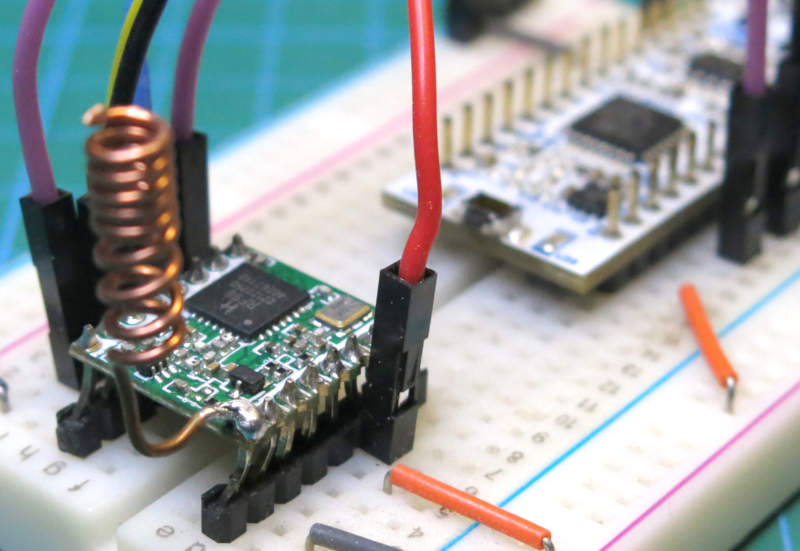
Following up from last weeks ESP32 LoRa quick start, here is a version for the STM32, and specifically Nucleo F303K8 or similar.
So if you need to slap together a quick LoRa-based project on an STM32 NUCLEO-F303K8 using STM32CubeIDE for testing, follow along here.
Parts needed:
- NUCLEO-F303K8 or similar
- RFM95W SX1276 LoRa transceiver (915MHz Module)
- Breadboard and wires
The focus on this quick start is to aim for 915.075 MHz. Our setup will be configured to pull Meshcore packets out of the air configured using the Australian NSW/ACT Regional settings. But you can easily change this for your region.
LoRa 915MHz board pinouts
Wire up the NUCLEO-F303K8 board to the HopeRF LoRa module or similar SX1276 based module as per the wiring diagram.
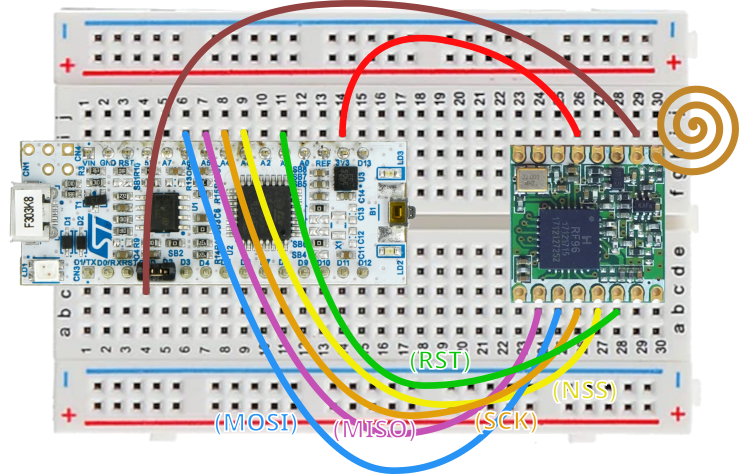
The LoRa library we will use is https://github.com/belyalov/stm32-hal-libraries/tree/master It's a little older, but it's simple and works with a tweak or two.
Setting up the project
With STM32CubeIDE:
- File > New > Create New STM32 Project
- In Board Selector, search for NUCLEO-F303K8
- Click Select and Next
- Name:
F303K8-LoRA-TestProject - Leave default options as C, Executable and STM32CubeIDE
Finish and say Yes to Initialize peripherals with their default mode.
While in the IOC configuration, we will set up SPI1 to communicate with the LoRa module. The USART2 will be our output console via USB to our terminal program.
Connectivity > SPI1
    Mode: Full Duplex Master
    Hardware NSS Signal: Disabled
Configure the SPI1/GPIO pins as:
- PA7 / A6 SPI MOSI
- PA6 / A5 SPI MISO
- PA5 / A4 SPI CLK
These are the default on this board anyway.
Parameter Settings:
Data size: 8bits
On the pinout view, click the PA4 pin and set to GPIO output.
- System Core > GPIO > Show All
- Select PA4, output level High, Output Push Pull, No pull up or pull down, Max speed Low, and make the label
SPI_NSS.
Connectivity > USART2
	Baud Rate: 115200
Close and Save which will start the first code generation.
Open Core/Src/main.c
Do a test build: Project > Build Project
LoRa library
We'll use the belyalov library for a quick no-frills test.
Copy https://github.com/belyalov/stm32-hal-libraries/blob/master/lora_sx1276.c to the Core/Src folder and copy https://github.com/belyalov/stm32-hal-libraries/blob/master/lora_sx1276.h to the Core/Inc folder
Include the LoRa library into main.c and we'll include a couple of other libs needed for working with strings and types:
/* Private includes ----------------------------------------------------------*/
/* USER CODE BEGIN Includes */
#include "lora_sx1276.h"
#include <string.h>
#include <stdio.h>
/* USER CODE END Includes */
With this LoRa library, you'll be tempted to follow their convention for the frequency. For example, the library has a define for the US:
#define LORA_BASE_FREQUENCY_US (915LLU*MHZ)
So you would think it a simple affair to define the Australian frequency suitable for Meshcore as:
#define LORA_BASE_FREQUENCY_AU (915075ULL * MHZ)
But the library messes it up. Just stick with the following and the frequency value will be correct:
/* Private define ------------------------------------------------------------*/
/* USER CODE BEGIN PD */
#define LORA_BASE_FREQUENCY_AU 915075000ULL
/* USER CODE END PD */
I'm pointing this out because I went down the rabbit hole assuming the frequency was set correctly and got no packets as a result.
In order to be able to output various debugging messages and packet information, we'll use printf. We can override _write for this:
/* Private user code ---------------------------------------------------------*/
/* USER CODE BEGIN 0 */
int _write(int file, const uint8_t *ptr, int len)
{
    HAL_UART_Transmit(&huart2, ptr, len, 1000);
    return len;
}
/* USER CODE END 0 */
And we'll try it inside main() with:
  /* USER CODE BEGIN 2 */

  printf("\r\nBegin LoRa module init.\r\n");

  /* USER CODE END 2 */
Click Run, and accept the Debugger and Startup defaults. You should get a message Begin LoRa module init. so we know that the terminal output is hooked up and running. Next we'll test SPI connection to the LoRa module. Add the following to basic initialization for the LoRa module:
lora_sx1276 lora;
uint8_t res = lora_init(&lora, &hspi1, GPIOA, SPI_NSS_Pin, LORA_BASE_FREQUENCY_AU);
if (res != LORA_OK) {
  printf("RFM95W init failed\r\n");
} else {
  printf("RFM95W init succeeded.\r\n");
}
You should get the following:
Begin LoRa module init.
RFM95W init succeeded.
This means we are able to connect to and use the LoRa module.
Now to configure the correct parameters so that we can sniff Meshcore LoRa packets from the NSW/ACT region using Australia (MID) settings:
lora_set_coding_rate(&lora, LORA_CODING_RATE_4_5);
lora_set_signal_bandwidth(&lora, LORA_BANDWIDTH_125_KHZ);
lora_set_spreading_factor(&lora, 9);
lora_set_preamble_length(&lora, 16);
lora_set_crc(&lora, 1);

lora_set_explicit_header_mode(&lora);
Build and run and let's see what you get in the console.
All our settings are looking good, but it is likely your output will be nothing more than:
  ===========> Nothing found. Status: 6
  ===========> Nothing found. Status: 6
But give it some time, you may get one packet on a very rare occasion. The answer to why is going to be the Sync Word settings which are very important for both Meshcore and LoRaWAN packets.
This library doesn't implement setting the Sync Word value. That's ok, it's a very basic addition that simply sets a register like the other functions in that library do. First add the prototype in the lora_sx1276.h file:
void lora_set_syncword(lora_sx1276 *lora, uint8_t value);
Then add the define for the LoRa Sync Work register in lora_sx1276.c:
#define REG_SYNC_WORD 0x39
And then the function definition (but must go below the static write_register function):
void lora_set_syncword(lora_sx1276 *lora, uint8_t value){
	write_register(lora, REG_SYNC_WORD, value);
}
And then set the sync word in main.c with:
lora_set_syncword(&lora, 0x12);
There is also a bug in the preamble function of the library. It doesn't set properly. Change line 435 of lora_sx1276.c:
From:
write_register(lora, REG_PREAMBLE_LSB, len & 0xf);
To:
write_register(lora, REG_PREAMBLE_LSB, len >> 0);
Having the correct sync word and preamble value is crucial for having rock solid performance. Your output will now give you:
===========> Nothing found. Status: 6
===========> Nothing found. Status: 6
===========> A packet was received OK. Size: 63 bytes long.
===========> A packet was received OK. Size: 61 bytes long.
===========> A packet was received OK. Size: 62 bytes long.
===========> Nothing found. Status: 6
===========> A packet was received OK. Size: 101 bytes long.
===========> A packet was received OK. Size: 101 bytes long.
===========> A packet was received OK. Size: 103 bytes long.
===========> Nothing found. Status: 6
===========> A packet was received OK. Size: 37 bytes long.
===========> A packet was received OK. Size: 38 bytes long.
===========> A packet was received OK. Size: 38 bytes long.
Nice. It would be good now to output the packets as hexadecimal strings to analyse them in something like Meshcore Packet Knife.
Let's add a function to dump the buffer as a hex string. Add the prototype to main.h:
/* USER CODE BEGIN EFP */
void PrintBufferAsHex(const uint8_t *buf, size_t len);
/* USER CODE END EFP */
The function definition to main.c next to the _write function:
/* USER CODE BEGIN 0 */
void PrintBufferAsHex(const uint8_t *buf, size_t len)
{
	char hexBuffer[511];
	if (len > 255U) len = 255U;

	for (size_t i = 0; i < len; ++i) {
		snprintf(&hexBuffer[i * 2U], 3U, "%02X", buf[i]);
	}

	HAL_UART_Transmit(&huart2, (uint8_t *)hexBuffer, (uint16_t)(len * 2U, 100U);
}
And finally, in our main.c:
if (res != LORA_OK) {
	printf("===========> Nothing found. Status: %d\r\n", res);
} else {
	printf("===========> A packet was received OK. Size: %d bytes long.\r\n", len);
	PrintBufferAsHex(buffer, len);
	printf("\r\n");
}
You should get a solid stream of packets.
  ===========> A packet was received OK. Size: 91 bytes long.
  154B851F4307CABB0E94F153DDDDB164CBCE211413388A26B26B5468A77A5AD50F4FDB37D6CE91B0CF0440B7F54AEA0BD352D5838A17D16B7410B4E3C248AD5F0A448AC9056C51967A82F671523665B307B30445061A4B742556FC
  ===========> A packet was received OK. Size: 93 bytes long.
  154C851F4307CABB0E94F153DDDDB164CBCE211413388A26B506B26B5468A77A5AD50F4FDB37D6CE91B0CF0440B7F54AEA0BD352D5838A17D16B7410B4E3C248AD5F0A448AC9056C51967A82F671523665B307B30445061A4B742556FC
In retrospect, there's been a number of necessary changes that you shouldn't have to do to that library. I'll get a PR up or fork a version.
Troubleshooting LoRa
So what happens if you get nothing in the logs? A few things to check, many are elemental but please recheck them. Basics first!:
- Check the frequency, this is the major cause. Close is not good enough. If you get nothing… ever… look to this first. Even if you set the input correctly, make sure your library set it right. Check your number format. If the library doesn't support something like
lora_get_frequency, do a register dump and check registers 0x06 = E4, 0x07 = C4 and 0x08 = CC which is 915.075. - Check the SF, BW, CR, Preamble and Sync Word. Getting these five wrong is the next most likely. Preamble never gets much of a mention but for picking up Meshcore packets, it's important.
- You can use the init message to test if the LoRa module is wired up correctly. Please note that if MOSI, MISO, NSS or SCK are wrong, you will get a failure. But if power/ground are missing, the HopeRF module will still initialize over SPI.
- Try it outside, though unlikely to help. LoRa has great penetration through walls and over great distances.
- Is the little antenna connected? Also check it on a VNA. As long as it's around the target frequency of 915 Mhz you're good. You should still be able to pick up a lot even if your antenna is a bit out of tune. So this is less likely a cause.
- Leave it running for a good 24 hours. You might even be out of range of any Meshcore signals, though every week this is becoming less likely the case for bigger cities towns and surrounds.